Yet another collection of suggestions

@thepatientvisigoth
Founding memberIdea makerBroker scoutBug hunter


Hi again! Here's a new round of feedback/suggestions after using Turbobulls more, mostly about imports and navigating transactions, plus a few possible bugs.
💬 Community website
- View/filter for threads I'm involved in. A "My threads" or "Participating" view (threads I started or replied to) would make it much easier to find my conversations again.
📥 Importing files
- Click the duplicates count to filter them. When an import shows e.g. "12 duplicates", clicking that count should filter the preview to show only those rows. Right now they're hard to find: in one import I had 326 pages of transactions, and the first duplicate was on page 126.
🧭 Navigating transactions
-
"Back to top" button. When exploring a long, filtered list of transactions, there's no quick way to get back to the top. I either have to scroll a long way up or click Wallet and set up the filters again, which also loses my place.
-
Ctrl+click and Shift+click to select rows. Ctrl+clicking a row currently does nothing. It would be great if it selected the row, and if Shift+click selected a range of rows, like in most file managers and email clients. This is much faster than aiming for the checkboxes, especially when selecting many rows.
-
Explain "Cleared". A short tooltip on the
Clearedcolumn header (or its values) explaining what it means would help. -
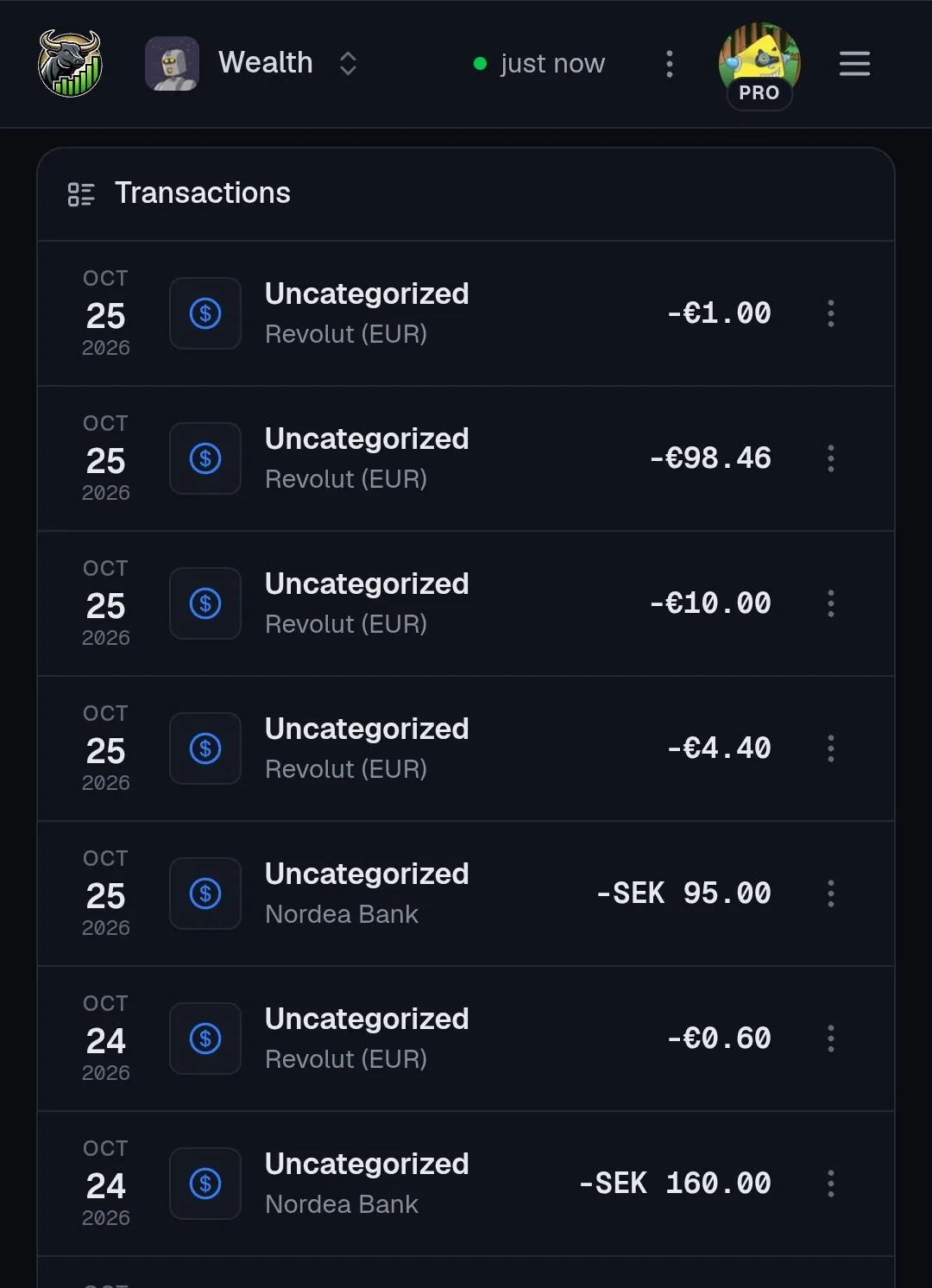
Mobile UI: show notes/name instead of category. In the transactions list on mobile, the notes/name is more useful for recognizing a transaction than the category. I understand that "Notes" field is optional and may be empty in a transaction, but in most of the cases it contains the description of the transaction. If the Notes column is empty, it can probably fallback to the category column.
🐛 Bugs
- "Select all" ignores active filters (Portfolio → Broker movements). After filtering by type (e.g.
Outside deposit), clicking "Select all" selects every row, not just the filtered ones. That's risky with bulk actions such as delete. - Type filter stays applied after its value disappears (Portfolio → Broker movements). If all rows of the filtered type are deleted, that type disappears from the filter dropdown and no longer shows as selected, but the filter is still applied, so the table stays empty with no visible way to clear it. To reproduce:
- Create a new broker.
- Add an
Outside deposittransaction. - Filter by Type →
Outside deposit. - Delete the
Outside deposittransaction. - The filter is still active, but
Outside depositno longer appears as selected.
- Auto-generated dividends might be using the record date instead of the payable date. For example, for Mastercard dividends the auto-generated transaction uses the value in the
Recordcolumn rather than thePayabledate. The two can be a month apart. For example, the latest Mastercard dividend has record date 10/09/26 and payable date 11/09/26. Using the payable date would match when the cash actually arrives in the account (https://investor.mastercard.com/stock-information/dividend-history/default.aspx ) - Minor wording: "Add another after saving". In the transaction creation form, "saving" can be confusing when the transaction isn't a saving, e.g. a Buy or a Withdrawal, since it reads like the savings type/category. Something like "Add another after creating" may be clearer.
Thanks! Happy to share examples or help reproduce anything.
4 replies

Sign in to reply with your Turbobulls account.